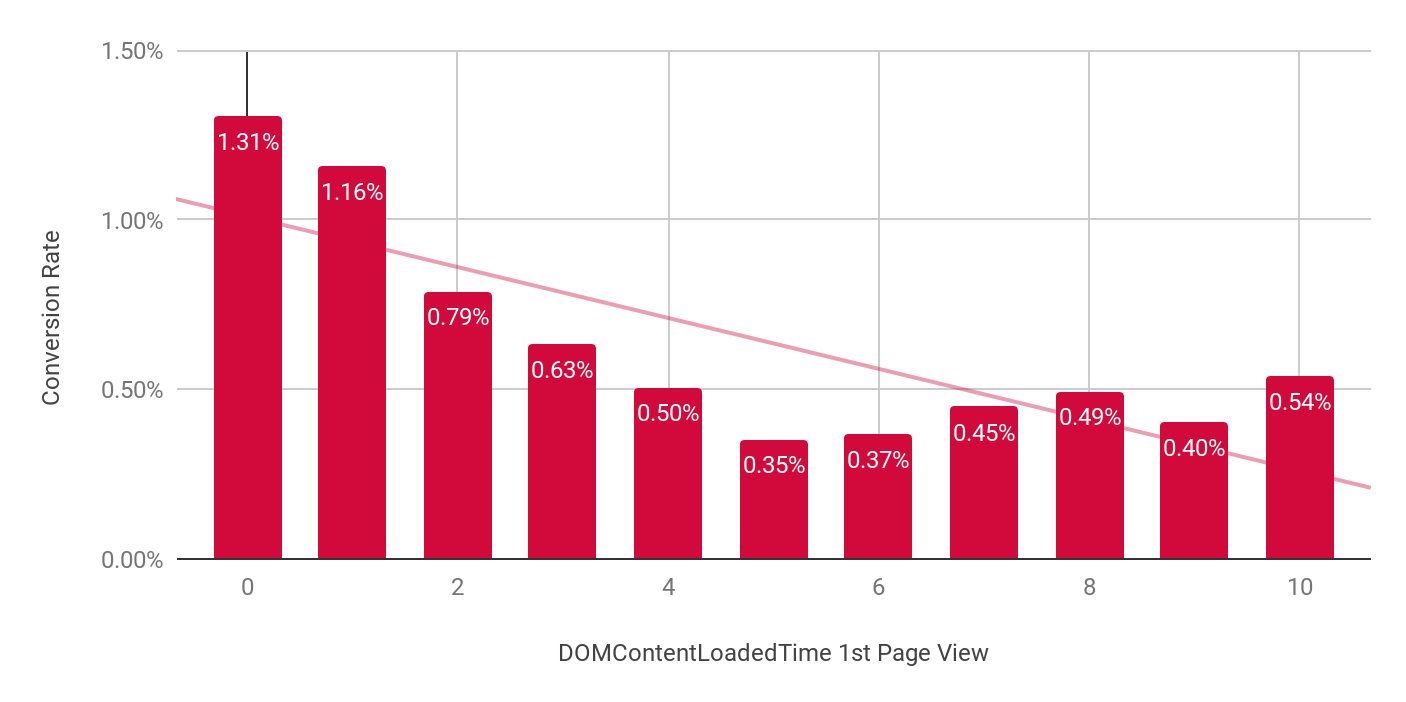
Website performance can make or break the user experience. A delay of just one second in page load time can reduce conversions by 7%, while 53% of mobile users abandon sites that take longer than three seconds to load. Performance testing identifies these issues before they impact your users and business.
This comprehensive guide walks you through the fundamentals of performance testing for websites—from understanding core concepts to implementing effective testing strategies. Whether you're a developer, QA engineer, or website owner, you'll learn practical techniques to ensure your site performs optimally under various conditions.
Understanding Performance Testing
What is Performance Testing?
Performance testing is a systematic process of determining how a website behaves under specific conditions. Unlike functional testing (which verifies if a system works correctly), performance testing examines speed, responsiveness, stability, and scalability under expected and extreme conditions.
The goal is to identify and eliminate bottlenecks before they affect end users by measuring metrics like response time, throughput, and resource utilization.
Types of Performance Testing
Different performance testing methods assess various aspects of your website's capabilities:
Test Type
Purpose
When to Use
Load Testing
Evaluates performance under expected user loads
Before major releases or traffic increases
Stress Testing
Determines breaking points by testing beyond normal capacity
To establish system limits and failure scenarios
Endurance/Soak Testing
Checks system behavior under sustained load over extended periods
To identify memory leaks and resource depletion issues
Spike Testing
Assesses response to sudden, significant load increases
For sites expecting flash crowds or viral content
Volume Testing
Tests handling of large data volumes
For data-intensive applications
Scalability Testing
Measures how effectively the system scales with increased resources
When planning infrastructure changes
The Performance Testing Process
An effective performance testing cycle follows these stages:
Test Planning: Define objectives, scope, and scenarios
Test Environment Setup: Configure testing infrastructure
Test Design: Create realistic user journeys and scripts
Test Execution: Run the tests while monitoring system behavior
Results Analysis: Interpret data and identify bottlenecks
Optimization: Implement improvements based on findings
Retesting: Validate that optimizations resolved the issues
Why Performance Matters for Websites
Business Impact of Website Performance
Website performance directly affects key business metrics:
Conversion rates: Amazon found that every 100ms of latency costs them 1% in sales
Bounce rates: Google discovered that as page load time increases from 1s to 3s, bounce probability increases by 32%
User engagement: Pinterest increased search engine traffic and sign-ups by 15% when they reduced perceived wait times by 40%
Revenue: Walmart observed a 2% increase in conversions for every 1-second improvement in page load time
Performance and User Experience
Users have increasingly high expectations for website performance:
79% of shoppers who experience poor website performance say they won't return to the site
47% of users expect websites to load in under 2 seconds
38% of users will stop engaging with a website if the layout is unattractive or slow
Mobile users are 5 times more likely to abandon tasks if a site isn't optimized for mobile devices
SEO and Performance
Since 2010, Google has included site speed as a ranking factor, and it became even more significant with the introduction of Core Web Vitals in 2021:
Faster sites get crawled more frequently and efficiently
Core Web Vitals (LCP, FID, CLS) directly impact search rankings
Mobile-first indexing prioritizes well-performing mobile sites
Better user experience signals (lower bounce rates, higher engagement) indirectly boost SEO performance
Preparing for Performance Testing
Essential Performance Testing Tools
Several tools can help you conduct effective performance tests:
Open Source Options:
Apache JMeter: Comprehensive load testing tool with a GUI
Gatling: Code-based performance testing with excellent reporting
Locust: Python-based tool focusing on developer-friendly scripting
k6: Modern load testing tool with JavaScript support
Commercial Solutions:
LoadRunner: Enterprise-grade performance testing suite
Use async/defer attributes for non-critical scripts
Remove unused code and reduce dependencies
CSS Optimization:
Inline critical CSS
Load non-critical CSS asynchronously
Remove unused styles
Minimize and compress CSS files
Backend Optimization Strategies
Caching Implementation:
Set up proper HTTP caching headers
Implement browser caching for static assets
Use CDN caching for global content delivery
Implement application-level caching
Example cache control headers:
Cache-Control: public, max-age=31536000, immutable  // For static resources that never change
Cache-Control: public, max-age=86400, must-revalidate  // For resources that change daily
Cache-Control: no-cache  // For dynamic content requiring validation
Database Optimization:
Add appropriate indexes
Optimize query structure
Implement connection pooling
Consider read replicas for high-traffic sites
Server Configuration:
Enable HTTP/2 or HTTP/3
Configure proper GZIP/Brotli compression
Optimize server threading and timeouts
Implement load balancing for high-traffic sites
Infrastructure Optimization
Content Delivery Network (CDN):
Distribute static assets across global edge servers
Enable edge caching for dynamic content where possible
Use CDN for SSL termination to reduce server load
Scaling Strategies:
Horizontal scaling: Add more servers to distribute the load
Vertical scaling: Increase resources on existing servers
Auto-scaling: Dynamically adjust resources based on demand
Section 7: Continuous Performance Testing
Integrating Performance Testing into CI/CD
Incorporate performance testing into your development workflow:
Establish baseline performance metrics for comparison
Create automated performance test suites that run on each build
Define performance budgets and enforce them in CI/CD pipelines
Implement continuous monitoring to catch issues early:
User-centric monitoring: Collect real user metrics (RUM) to understand actual user experience
Synthetic monitoring: Schedule regular tests from different locations
Server monitoring: Track resource utilization and application performance
Alert configuration: Set up notifications for performance anomalies
Performance Testing Best Practices
Test Early and Often:
Shift performance testing left in the development cycle
Run smaller tests during development to catch issues early
Perform comprehensive tests before major releases
Focus on the User Experience:
Prioritize testing user-critical paths
Measure perceived performance, not just technical metrics
Test across various devices and network conditions
Maintain Performance Knowledge Base:
Document performance patterns and solutions
Create reusable test scripts and scenarios
Share performance insights across development teams
Conclusion
Performance testing is not a one-time activity but an essential ongoing website development and maintenance process. By implementing the strategies outlined in this guide, you can identify and resolve performance issues before they impact your users and business outcomes.
Remember these key takeaways:
Performance directly impacts user experience, conversion rates, and SEO rankings
Different types of performance tests serve different purposes—use the right test for your goals
Establish clear performance metrics and benchmarks before testing
Analyze both frontend and backend components to identify bottlenecks
Implement a continuous performance testing strategy integrated with your development workflow
As web technologies and user expectations evolve, staying vigilant about performance will ensure your website remains competitive, user-friendly, and effective at achieving your business goals.
We at CreoWis believe in sharing knowledge publicly to help the developer community grow. Let’s collaborate, ideate, and craft passion to deliver awe-inspiring product experiences to the world.
This article is crafted by Syket Bhattachergee, a passionate developer at CreoWis. You can reach out to him on X/Twitter, LinkedIn, and follow his work on the GitHub.